Rebooting your RSS Server
It is important to ensure that the necessary updates and security patches are applied to your RSS Server to keep it running smoothly and secure. In order for these updates to be applied, the server must be rebooted periodically. We highly suggest that you reboot your RSS Server at least once a month. Depending on how long it has been since your server was last rebooted, this process can take a couple hours.
Another reason to ensure that your RSS Server is up-to-date is that it effects the speed at which a server backup can be initialized. Since backups are initialized from a copy of your RSS Server while it is in a "stopped" state, updates will be applied automatically when the server is started again. Or in our case, when we need to us a backup copy to recover an RSS Server the process will be delayed until the server can apply necessary updates.
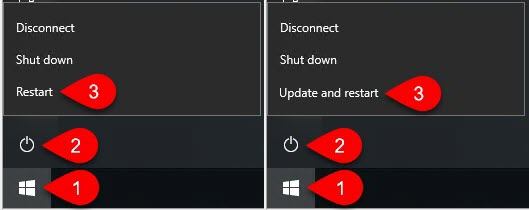
Although it is possible to reboot your RSS Server from the Rossware Dashboard, we recommend the easier way of doing it from the RSS Server itself. From any RSS (login) account with administrator permissions, you can click on the Windows start button at the far left of your taskbar. When the start menu opens, click on the power icon (it will be the first icon above the start button). Then choose the option to either Restart, or to Update and restart.
Please be advised that if your RSS Server has not been rebooted in a significant amount of time, the process to apply updates and finish the reboot can be lengthy. We advise doing this process at the start of the weekend to ensure that the server will be up and running by the following Monday.